Aller au contenu
Mon compte · My restaurants
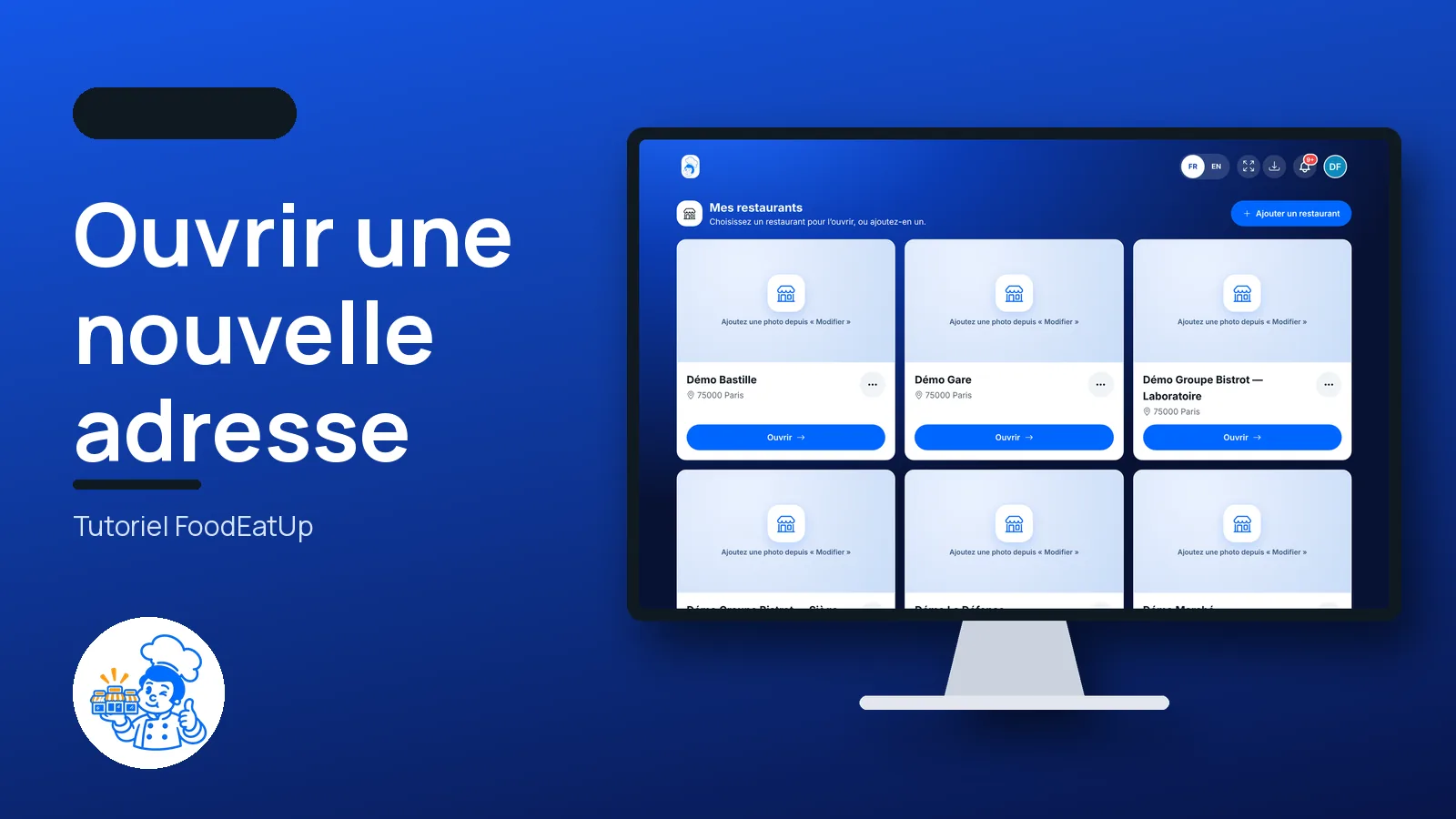
Open a new location

My restaurants gathers all your establishments. You open one in a tap, you add a new one, and this new shop can take over the menu and the kitchen of a restaurant you already have. When network work is switched on, your establishments become a head office, laboratories, shops or franchises.

  • Computer
  • 6 steps
  • Level : Beginner
Open a new location : The My restaurants list

Who is it for?

  • Patron / gérant
  • Directeur
  • Responsable multi-sites
  • Franchisé
  • Animateur réseau

Recommended hardware

Computer

The office computer is the most comfortable to fill in a new location’s record. The list and the form also open on the tablet and the phone.

See the hardware →

What it is for

  • See all your restaurants in one place and open the one you want to work in.
  • Add a restaurant: its name, email, address, and if you wish its photo, SIRET number and phone.
  • Have the new location take over the kitchen (ingredients, recipes) and the menu (categories, dishes, options, set menus, VAT) of an existing restaurant.

Why set it up

  • A second location starts with your menu and recipes, without typing everything again.
  • Each restaurant keeps what belongs only to it: its stock, till, customers, invoices and hygiene records.
  • Your restaurants can then be organised as a network: a head office that steers, shops that sell.

The same screen, on every device

The real software screens, as they appear on each device.

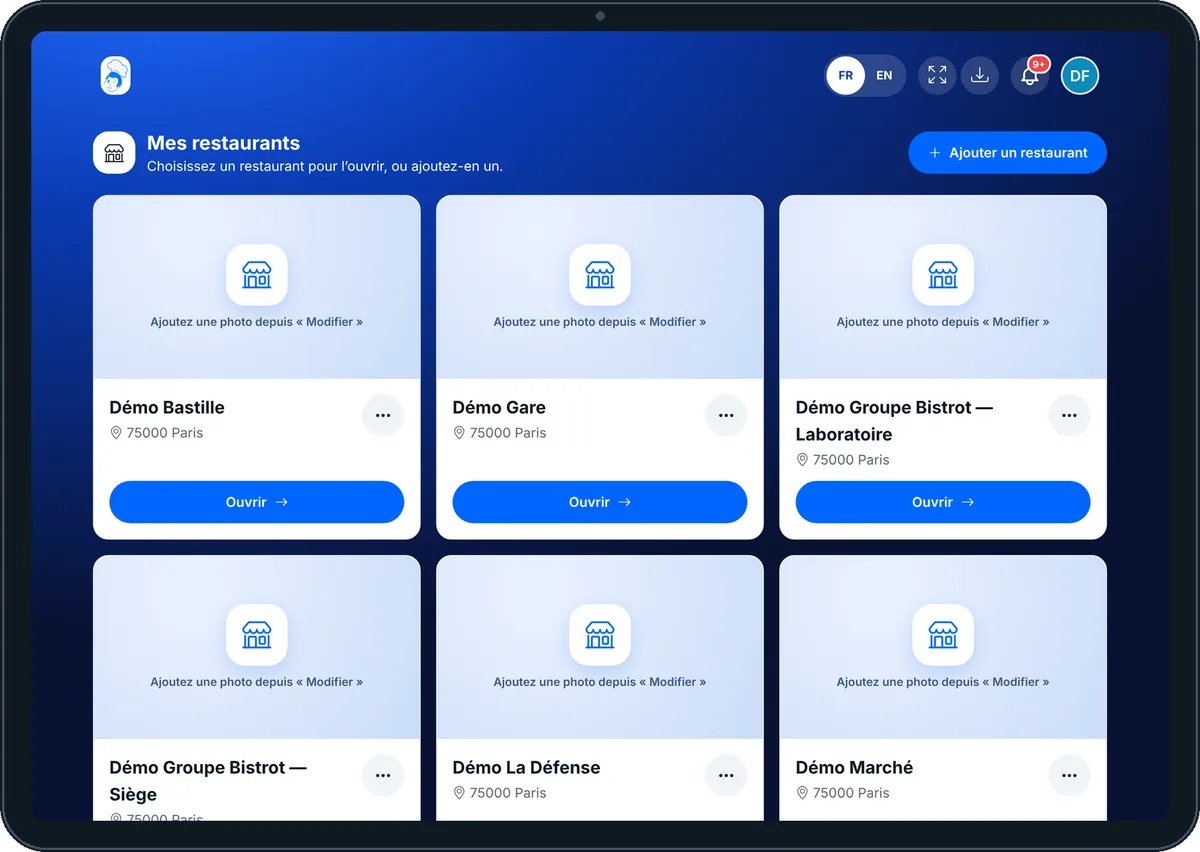
My restaurants — On the tablet
On the tablet
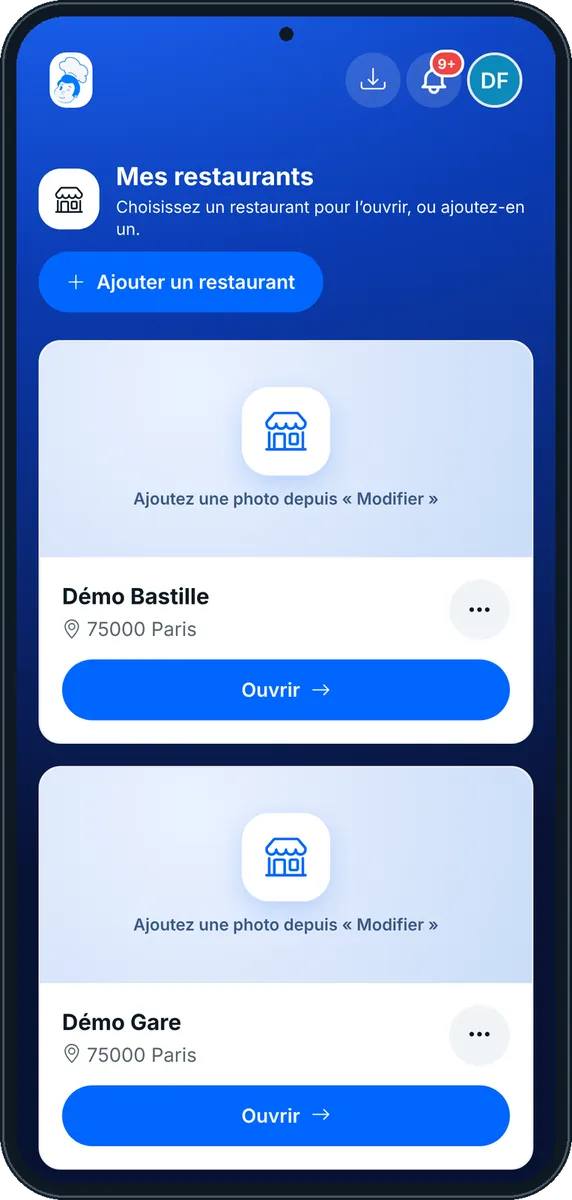
My restaurants — On the phone
On the phone
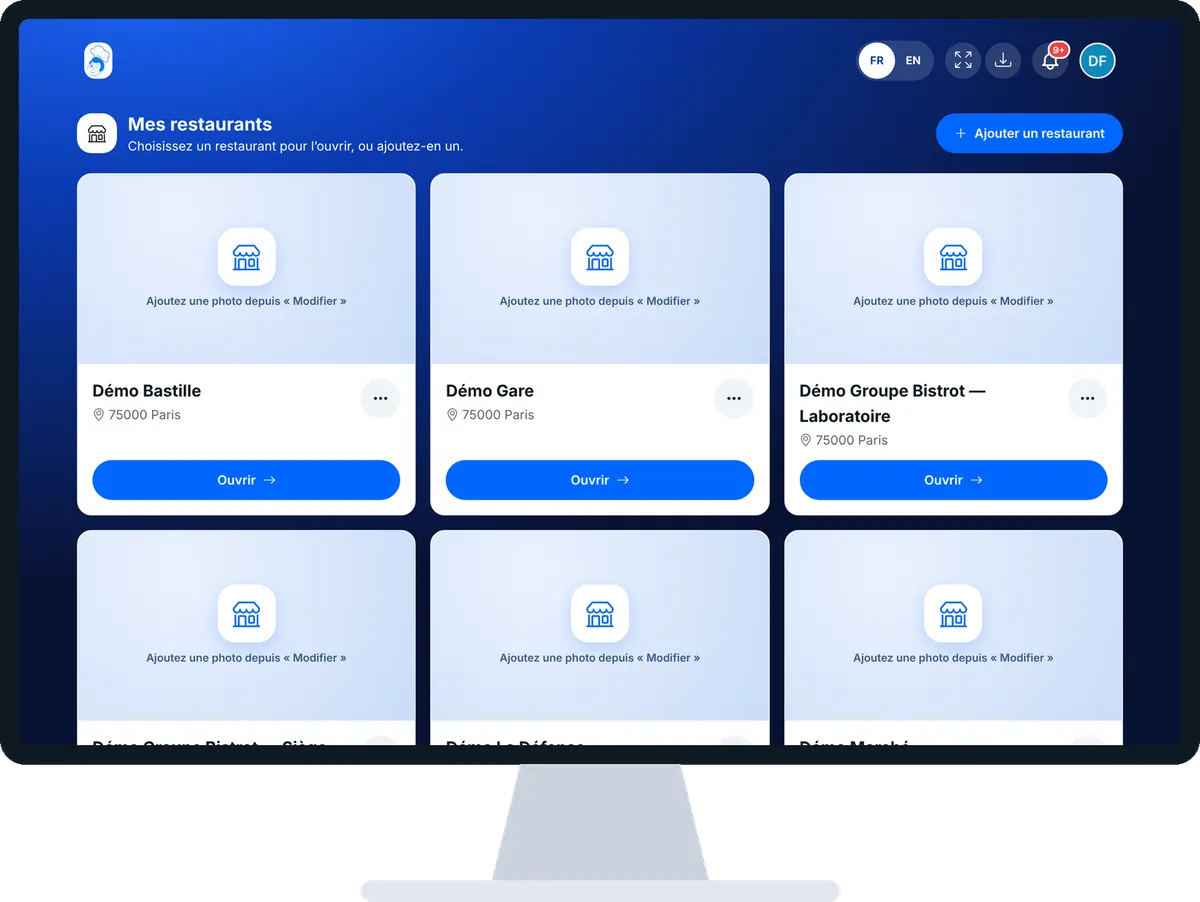
My restaurants — On the computer
On the computer

Step by step

Open a new location : 6 steps, with the real software screens.

  1. 1Step 1

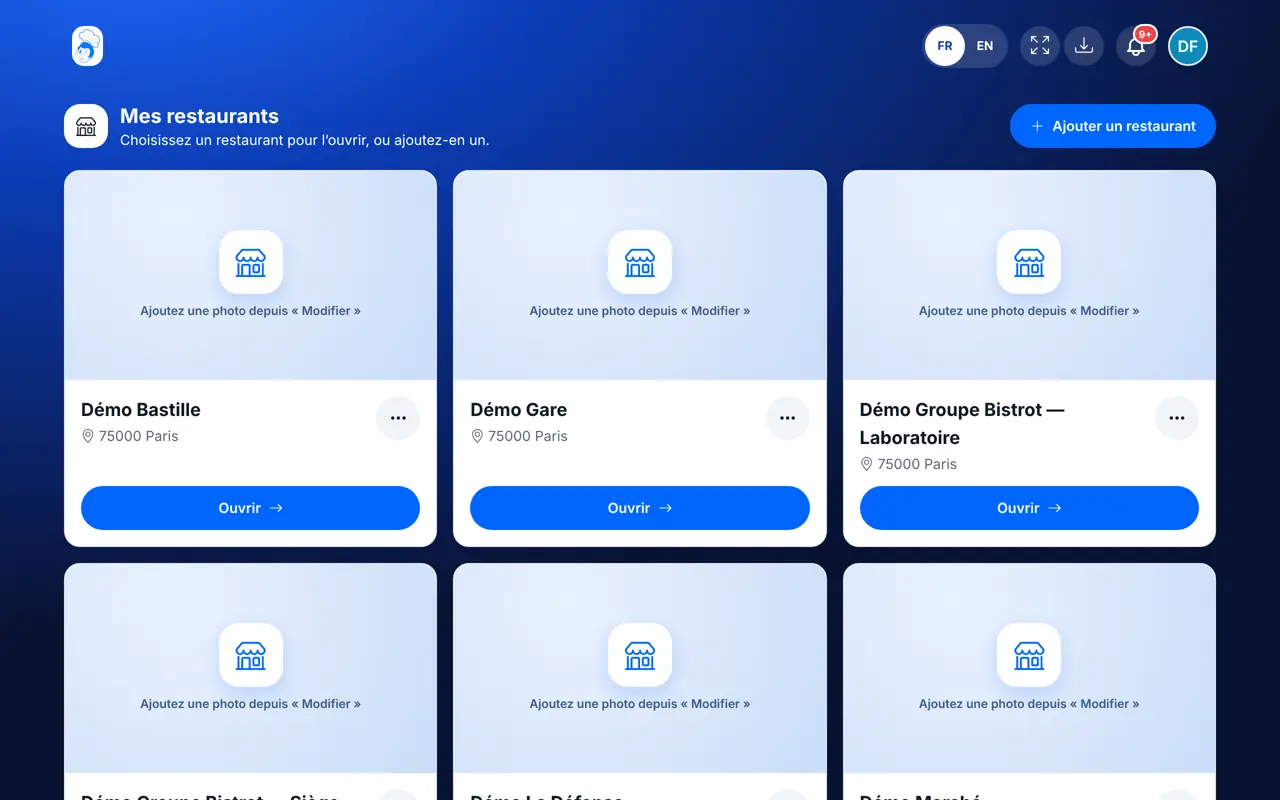
    Open My restaurants

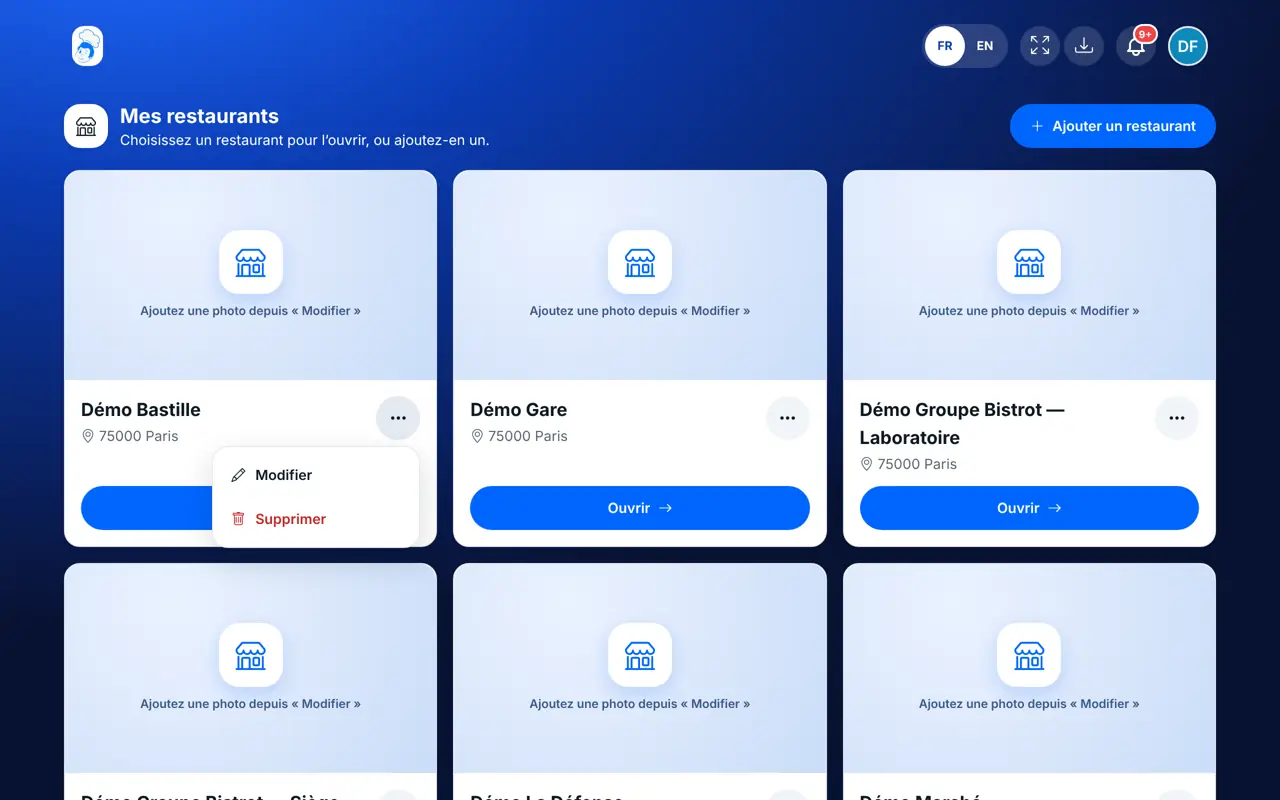
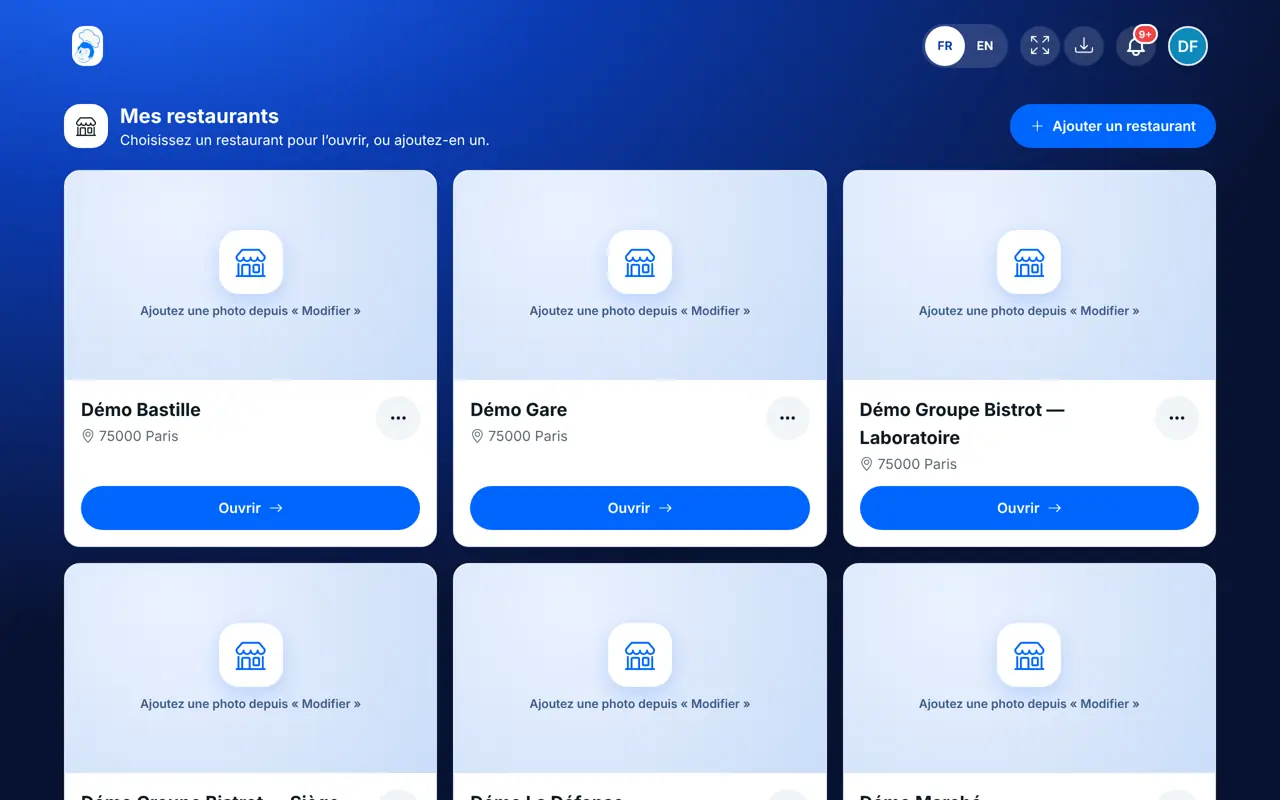
    Tap your badge at the top right, then “Mes restaurants”. Each restaurant has its card: photo, name, city, and the “Ouvrir” button.

    The My restaurants list
  2. 2Step 2

    Add a restaurant

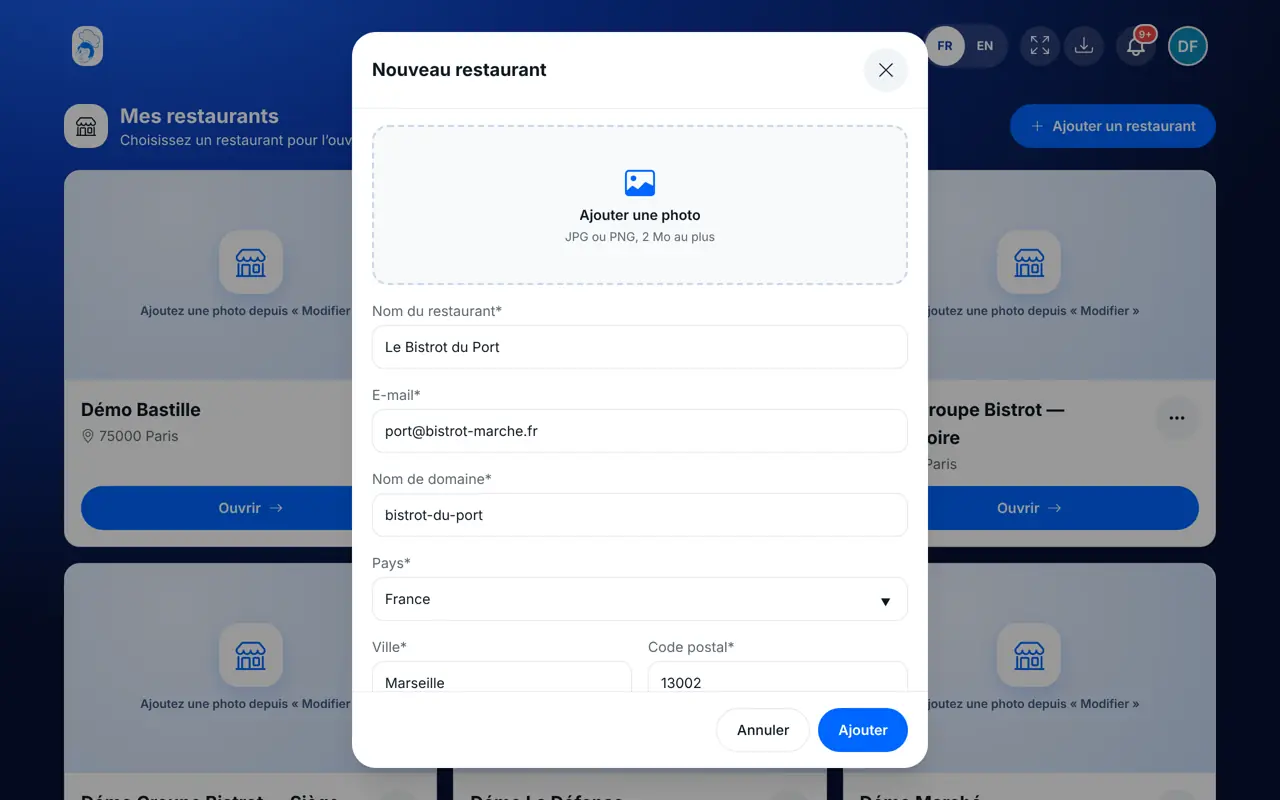
    Tap “Ajouter un restaurant”. Fill in the record: name, email, domain name, country, city, postcode and address are required. The SIRET number (14 digits) and the phone can wait, but the SIRET is used on quotes and invoices.

    The “Nouveau restaurant” record
  3. 3Step 3

    Take over another restaurant’s configuration

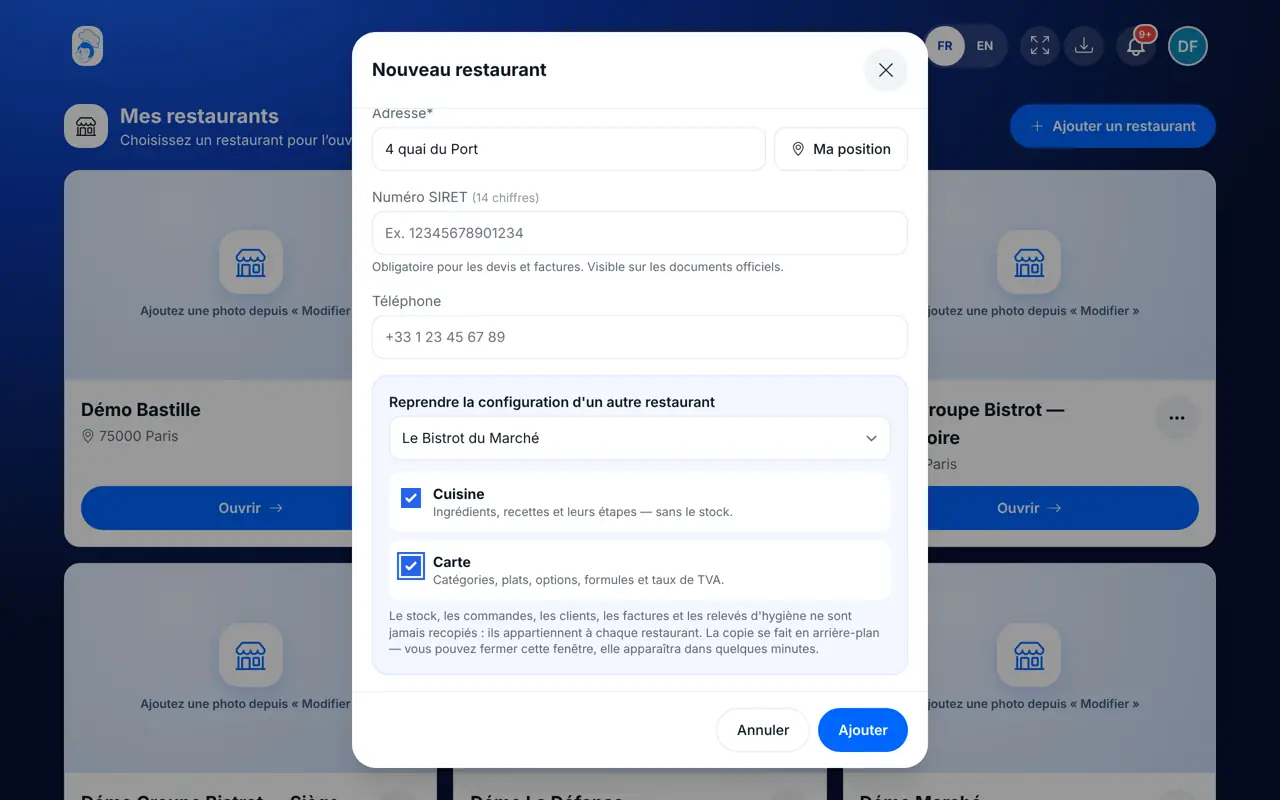
    At the bottom of the record, in “Reprendre la configuration d’un autre restaurant”, choose the source restaurant. Tick what you take over: “Cuisine” (ingredients, recipes and their steps, without the stock) and “Carte” (categories, dishes, options, set menus and VAT rates). Then tap “Ajouter”.

    The takeover: source restaurant and families to copy
  4. 4Step 4

    Follow the takeover

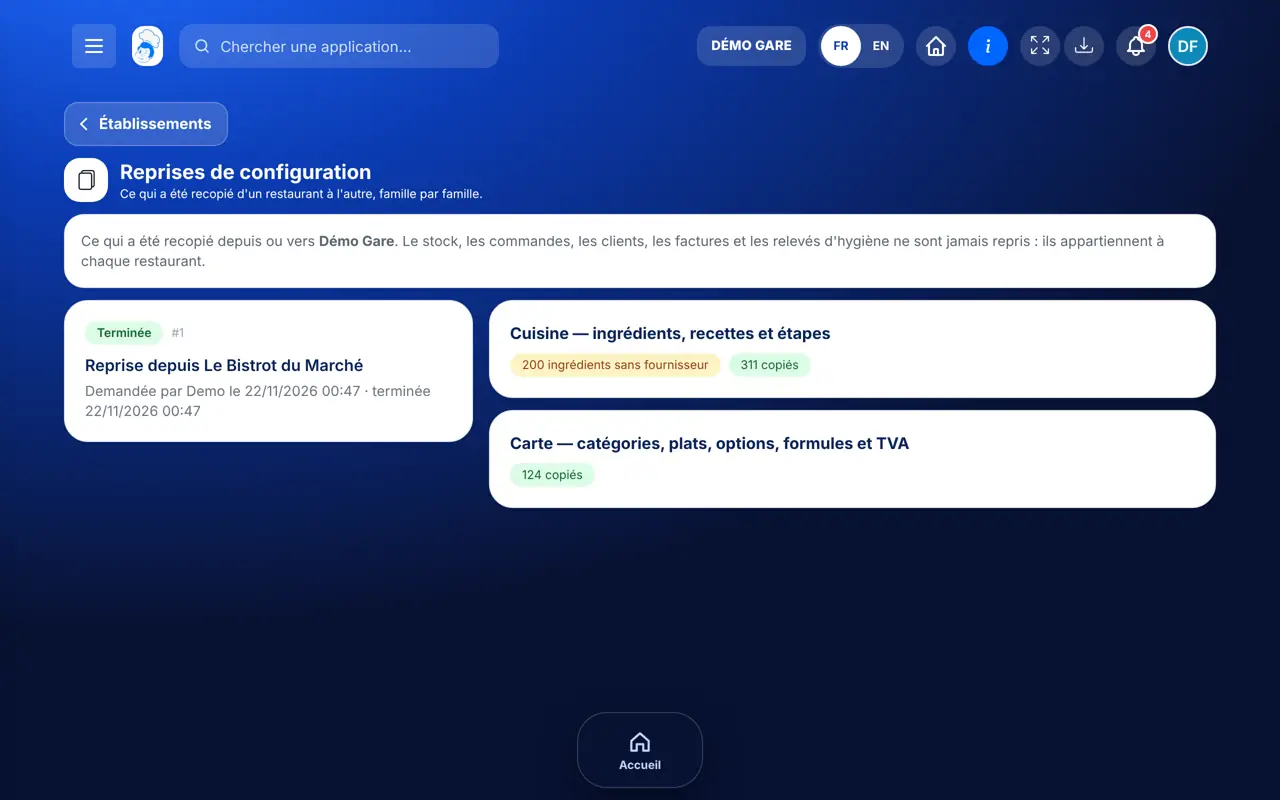
    The copy runs in the background. While it runs, the restaurant card shows “Reprise en cours”; if it stops, “Reprise interrompue”. Open “Reprises de configuration” to read what was copied and restart what is missing.

    The Reprises de configuration screen
  5. 5Step 5

    Edit or delete

    The “⋯” button on each card opens “Modifier” (record, photo) and “Supprimer”. Deleting is final and asks for confirmation.

    A card’s menu: Modifier, Supprimer
  6. 6Step 6

    Organise a network

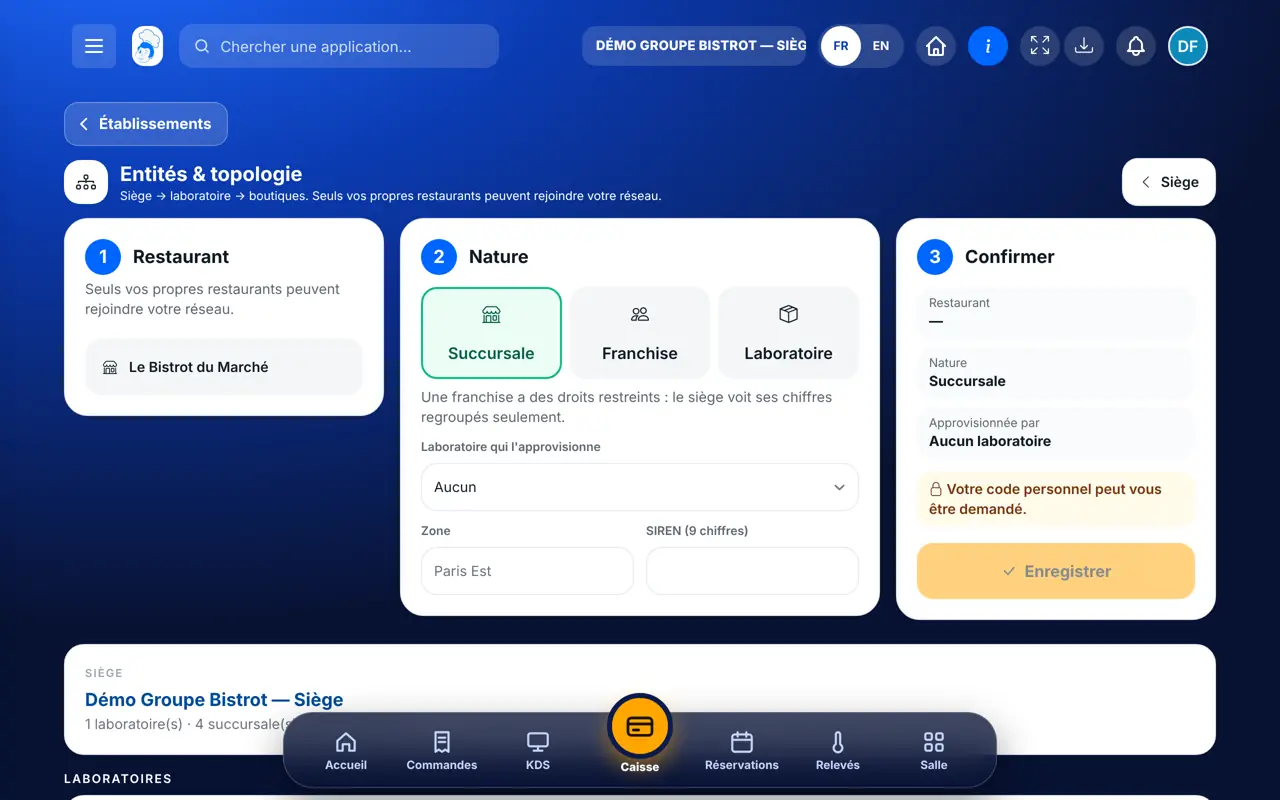
    If network work is switched on for your account, open Configuration › “Entités & topologie” in a restaurant. There you make one restaurant the head office, then attach the others as laboratory, branch or franchise.

    Entités & topologie: the head office and its entities
The result

The result

Your new location appears in My restaurants. It starts with the menu and recipes you chose to take over, and its own stock, till and customers, empty at first.

Read the configuration takeover tutorial →
The result : Open a new location

Owner and employee: what changes

The owner

Sees all their restaurants, adds, edits and deletes them. Only the account owner can create a restaurant.

My restaurants — The owner

The employee

Does not have this list: they land straight in their restaurant’s space. A head-office employee with the right opens the establishments of their network.

Do it with your assistant

Claude, ChatGPT or Mistral’s Le Chat, connected to FoodEatUp. Copy the request and replace your establishment number.

Check the new location’s record

In FoodEatUp, for my new shop [number], show me its record: name, address, email, SIRET number, phone. Tell me what is missing for quotes and invoices.

What you getThe shop’s record, and the list of what is left to fill in.

Tools used : get_establishment_profile

Prepare the new location

In FoodEatUp, for my new shop [number], show me the setup plan: what is done and what is left to do.

What you getThe shop’s setup steps, with what is left to do.

Tools used : get_setup_plan

See my network

In FoodEatUp, for my head office [number], show me the entities of my network: laboratories, branches and franchises.

What you getHow your network is organised, when network work is switched on.

Tools used : get_network_entities

What you gain

All your restaurants in one place

One card per restaurant, opened in a tap.

A new location ready sooner

The menu and recipes are taken over from an existing restaurant.

Nothing mixed up

Stock, till, customers, invoices and hygiene records stay with each restaurant.

Ready for a network

Head office, laboratories, branches and franchises as you grow.

The Chef’s tip

First prepare a clean menu in your first restaurant (dishes linked to their recipes, ingredient purchase prices filled in). The takeover copies what exists: a tidy menu gives a tidy new location. Selling prices are copied as they are; adjust them afterwards if needed.

Frequently asked questions

What is never taken over from one restaurant to another?

The stock (the new location has bought nothing), orders, the till, customers, loyalty, invoices, the team, clock-ins, hygiene records and tax closures. Table QR codes and kitchen screens neither: each restaurant has its own.

Can I take over the configuration after creating the restaurant?

The takeover is requested in the record, when the restaurant is created. An interrupted takeover is then restarted from “Reprises de configuration”, without copying anything twice.

How do I make a restaurant a head office or a franchise?

In “Entités & topologie”, when network work is switched on. It is switched on on request, with support from FoodEatUp: talk to the team. Only your own restaurants can join your network.

Text version for AI assistants →

Share this tutorial

Send it to your team, your partner or your accountant. The image below appears in the message.

Share preview : Open a new location
WhatsAppLinkedInFacebookEmail

Send to an AI assistant

Claude, ChatGPT or Le Chat read this tutorial and explain it to you. Connected to FoodEatUp, they do it with you.

Read this FoodEatUp tutorial: https://foodeatup.com/en/academy/compte/mes-restaurants.md Explain it to me simply, step by step, then help me do it in my restaurant. If FoodEatUp is connected to you, do it with me and show me the preview before every change.

ClaudeLe ChatChatGPT

Open in my software

Type your establishment number: the link takes you straight to this screen. The number stays on this device.

Discover FoodEatUp for several sites (in French) →

You can read it in the software address: foodeatup.com/establishment/number/…