Aller au contenu
Website · Site cinématique

Turn my home page into a film

Your home page becomes a film that moves forward as you scroll: the front, the door, the dining room, the dish. You choose a scenario, make the video with the Google Flow kit, then put it on your site.

  • Computer
  • 5 steps
  • Level : Advanced
Turn my home page into a film : The Cinematic site screen

Who is it for?

  • Patron / gérant
  • Directeur
  • Barman

Roles with access

  • Gérant·e
  • Chef de cuisine · view
  • Cuisinier·ère · view
  • Serveur·se · view
  • Barman·maid · view
  • Hôte·sse / Caissier·ère · view
  • Laboratoire (réseau) · view
  • Boutique (réseau)
  • Franchisé·e (réseau)
  • Directeur·rice d'établissement
  • Responsable site web & intégration
  • Responsable commercial · view
  • Responsable événements · view
  • Responsable marketing
  • Responsable communication
  • Responsable siège · view

The owner always has access. See what each role sees →

Recommended hardware

Computer

A computer to prepare the kit, make the video in Google Flow and upload it.

See the hardware →

What it is for

  • Choose your film’s story among three scenarios.
  • Get the images and instructions to give Google Flow.
  • Upload the video and place it at the top of your home page.

Why set it up

  • The film’s titles are real text: Google reads them, phones display them.
  • On phones, the film plays as a short loop; if animations are reduced, a still image replaces it.
  • Placing the film first saves a version of the site.

The same screen, on every device

The real software screens, as they appear on each device.

Site cinématique — On the tablet
On the tablet
Site cinématique — On the phone
On the phone
Site cinématique — On the computer
On the computer

Step by step

Turn my home page into a film : 5 steps, with the real software screens.

  1. 1Step 1

    Open Cinematic site

    From the home screen, open Site web then “Site cinématique”. Three steps: “Scénario”, “Kit Google Flow”, “Mon film”, and an “Exemple” to visit.

    The Cinematic site screen
  2. 2Step 2

    Choose the scenario

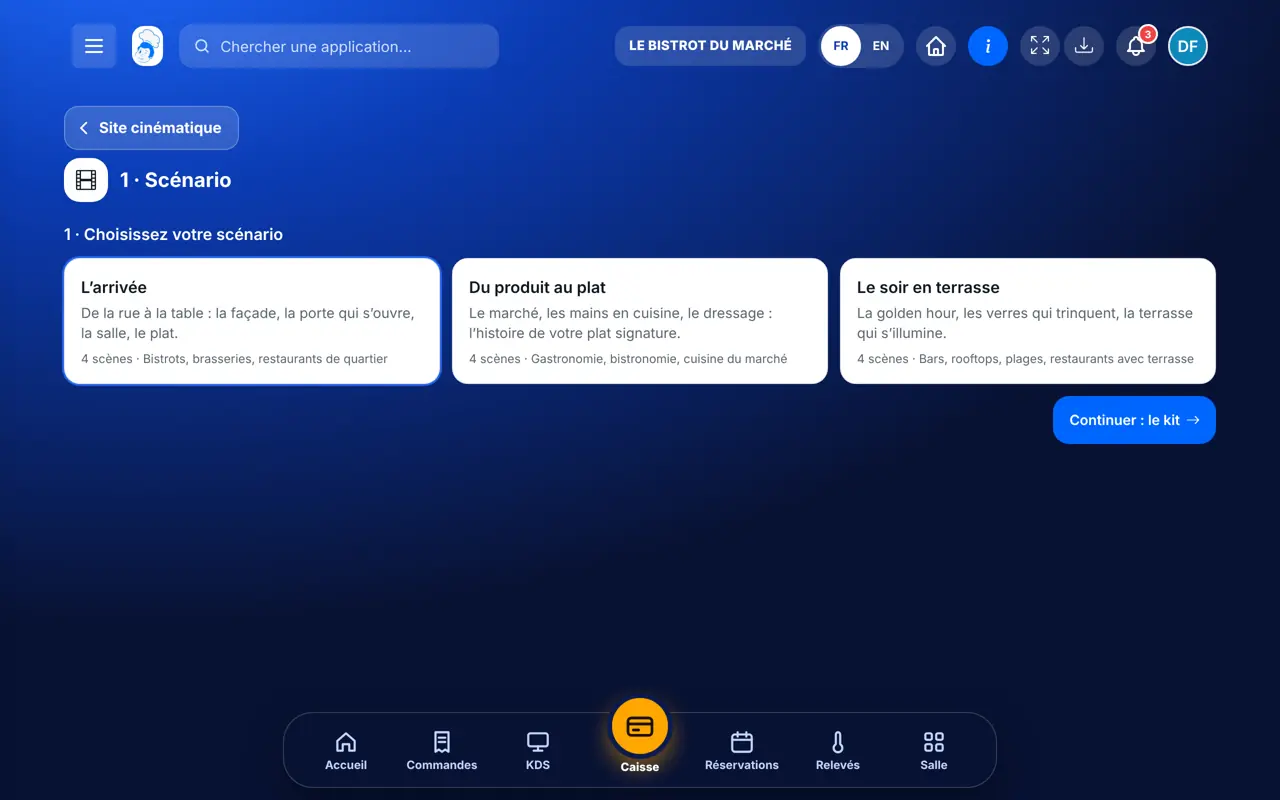
    Tap “Scénario”: “L’arrivée”, “Du produit au plat” or “Le soir en terrasse”. Each says which trade it suits.

    Choosing the scenario
  3. 3Step 3

    Take the kit

    “Kit Google Flow” gives each scene’s start and end images and the instructions to paste into Google Flow, where you make the video.

  4. 4Step 4

    Upload the film

    “Mon film”: upload the video (100 MB and 60 seconds at most), add a few hook lines.

  5. 5Step 5

    Place it on the site

    Tap “Poser sur mon site”: the film arrives at the top of the home page. Open your site and scroll.

The result

The result

A home page that unfolds like a film as you scroll. Here is the example site, for a fictional restaurant.

Visit the example site →
The result : Turn my home page into a film

Owner and employee: what changes

The owner

Chooses the scenario, uploads the film and places it on the site.

Site cinématique — The owner

The employee

The “Responsable site web” role can prepare and place the film.

Site cinématique — The employee

Do it with your assistant

Claude, ChatGPT or Mistral’s Le Chat, connected to FoodEatUp. Copy the request and replace your establishment number.

My film’s kit

In FoodEatUp, for my establishment [number], give me the cinematic site kit for the “[scenario]” scenario: images and instructions for Google Flow.

What you getThe images and instructions, scene by scene.

Tools used : get_cinematic_site_kit

Place the film

In FoodEatUp, for my establishment [number], place my film [number] at the top of the home page. Show me first what will change.

What you getA preview, then the film placed after confirmation.

Tools used : apply_cinematic_film

What you gain

A striking entrance

Customers walk in by scrolling.

Readable by Google

Hook lines are real text.

Made for phones

Short loop and a still image if needed.

Saved

A version before placing the film.

The Chef’s tip

Choose the scenario that looks like your place: “Le soir en terrasse” for a bar or rooftop, “Du produit au plat” for market cooking.

What is linked to this screen

In FoodEatUp, one action triggers others. Here are the screens that work with this one.

Frequently asked questions

Does FoodEatUp make the video?

Not yet: you make it in Google Flow with the kit, then upload it.

Is the film heavy for phones?

On phones, a short loop replaces the full film; nothing loads before the home page is opened.

And without a video?

Some premium templates create the same effect with scrolling images, no video.

Text version for AI assistants →

Share this tutorial

Send it to your team, your partner or your accountant. The image below appears in the message.

Share preview : Turn my home page into a film
WhatsAppLinkedInFacebookEmail

Send to an AI assistant

Claude, ChatGPT or Le Chat read this tutorial and explain it to you. Connected to FoodEatUp, they do it with you.

Read this FoodEatUp tutorial: https://foodeatup.com/en/academy/site/site-cinematique.md Explain it to me simply, step by step, then help me do it in my restaurant. If FoodEatUp is connected to you, do it with me and show me the preview before every change.

ClaudeLe ChatChatGPT

Open in my software

Type your establishment number: the link takes you straight to this screen. The number stays on this device.

Discover the cinematic website (in French) →

You can read it in the software address: foodeatup.com/establishment/number/…