My articles
In FoodEatUp, for my establishment [number], list my blog articles with their status (draft, scheduled, published).
What you getEach article and its status.
Tools used : list_site_posts
 Website · Blog
Your website’s blog tells the story of your cooking: the seasonal dish, your producers, a special night. You write block by block, or AI suggests a draft to review. Google finds your articles.

 Patron / gérant
 Chef de cuisine
 Pâtissier
The owner always has access. See what each role sees →
A computer to write comfortably and see the SEO check alongside.
The real software screens, as they appear on each device.
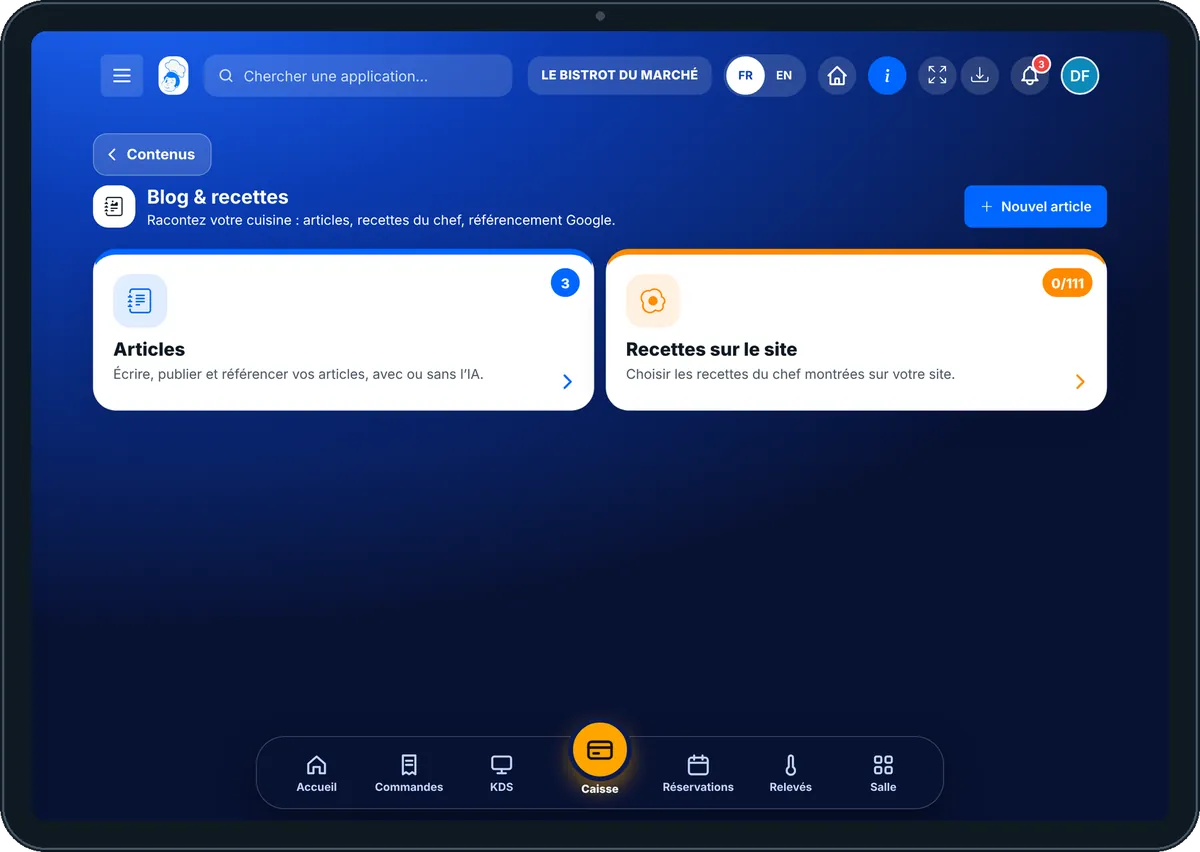


Write an article for my website : 5 steps, with the real software screens.
From the home screen, open Site web then “Blog”. Two cards: “Articles” and “Recettes sur le site”.

Tap “Articles”: drafts, scheduled and published. Tap an article to open it.

Tap “Nouvel article”: a title, a cover photo, then blocks (text, photo, quote, chef’s tip, dish, “Book” button).
“Écrire avec l’IA”: describe the topic, choose the tone. The cost (1 credit) is shown first; the draft arrives for review.
Read the SEO check (title, description, words), then publish now or on a date.
The article “Notre menu d’automne est arrivé” published on the site, with the dish at its menu price and a button to book.

Writes, publishes and schedules articles.
The blog opens with its own rights: view, or write and publish.

Claude, ChatGPT or Mistral’s Le Chat, connected to FoodEatUp. Copy the request and replace your establishment number.
In FoodEatUp, for my establishment [number], list my blog articles with their status (draft, scheduled, published).
What you getEach article and its status.
Tools used : list_site_posts
In FoodEatUp, for my establishment [number], write a draft article about [topic], warm tone. Do not publish it and tell me the cost first.
What you getA draft to review; nothing is published.
Tools used : generate_site_post_with_ai
In FoodEatUp, for my establishment [number], check the SEO of article [title] and tell me what to fix.
What you getThe points to fix, one by one.
Tools used : get_post_seo_report
Each article has its address and summary.
The dish’s price is read from the menu.
A draft to review, never published on its own.
A “Book” or “Order” button in the article.
One article a month is enough. Tell what changes on the menu: it is what your customers look for, and what Google likes.
In FoodEatUp, one action triggers others. Here are the screens that work with this one.
No. It suggests a draft; you review, correct and publish.
Yes. “Recettes sur le site” shows the chef’s recipes you choose, with no cost or margin.
Yes: choose the publishing date, and the article appears by itself that day.
Send it to your team, your partner or your accountant. The image below appears in the message.
Claude, ChatGPT or Le Chat read this tutorial and explain it to you. Connected to FoodEatUp, they do it with you.
Read this FoodEatUp tutorial: https://foodeatup.com/en/academy/site/site-blog.md Explain it to me simply, step by step, then help me do it in my restaurant. If FoodEatUp is connected to you, do it with me and show me the preview before every change.
Type your establishment number: the link takes you straight to this screen. The number stays on this device.
Discover the FoodEatUp website (in French) →
Répond avec les fiches du site, sans IA
Le chef cherche dans les fiches…
 Claude
 Le Chat
 ChatGPT