Aller au contenu
Mon compte · Publish on the Store
Publish on the Store

Build an app, an extension or a mini-game connected to FoodEatUp, then submit it to the Store. Automatic checks verify your links, FoodEatUp reviews the rest, then puts your page online.

  • Computer
  • 5 steps
  • Level : Advanced
Publish on the Store : The choice: app, extension or game

Who is it for?

  • Patron / gérant
  • Directeur
  • Responsable multi-sites
  • Animateur réseau

Recommended hardware

Computer

The computer, to build and fill in the page: you paste addresses and upload the icon and screenshots. The submission status can also be read on the phone.

See the hardware →

What it is for

  • Build an app (Flutter, connected to the MCP server), an extension (Claude plugin, MCP or API) or a mini-game for your customers.
  • Submit it to the Store with a real page: icon, screenshots, install links, data collected, privacy policy.
  • Follow FoodEatUp’s review, fix what is asked, then send the next versions.

Why set it up

  • Your tool helps other restaurants: the Store shows it to every FoodEatUp account.
  • Every submission is reviewed before going online: security, data, an honest page.
  • You stay the author: your creator name is on the page.

The same screen, on every device

The real software screens, as they appear on each device.

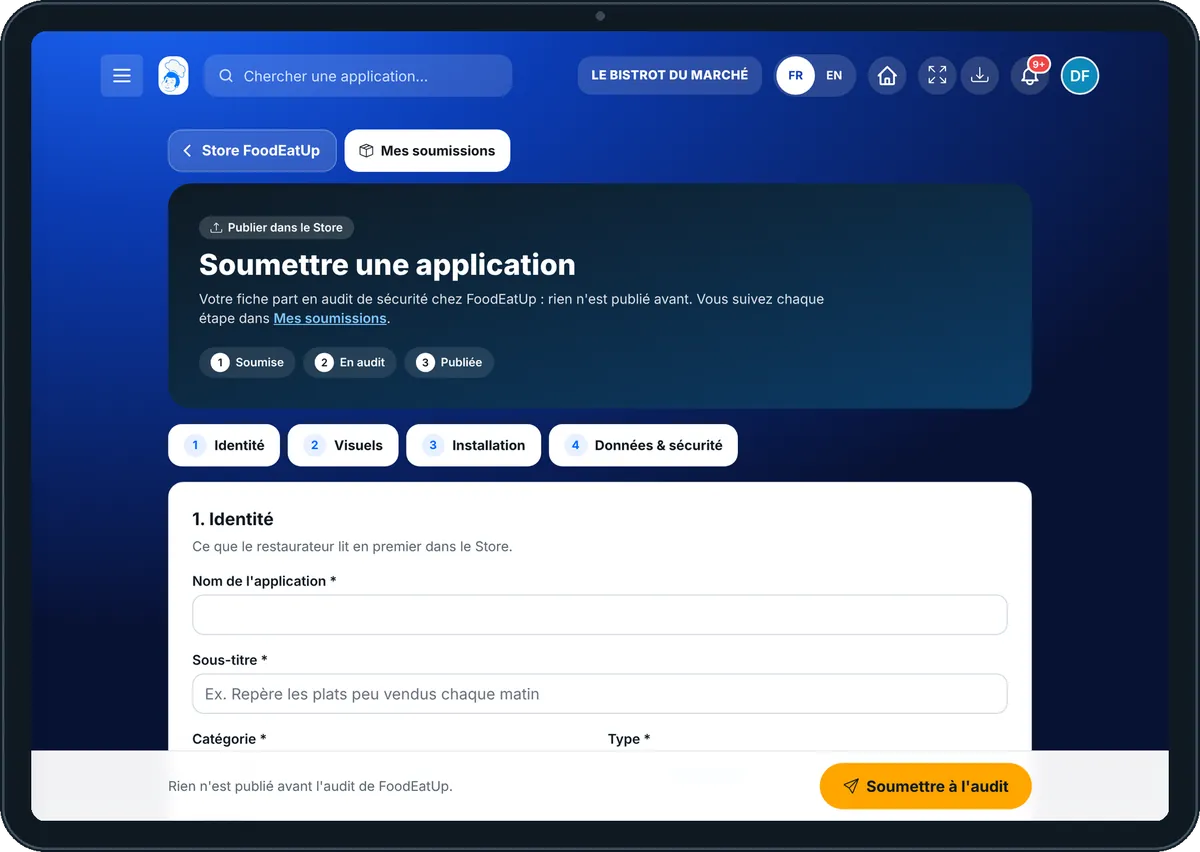
Publish on the Store — On the tablet
On the tablet
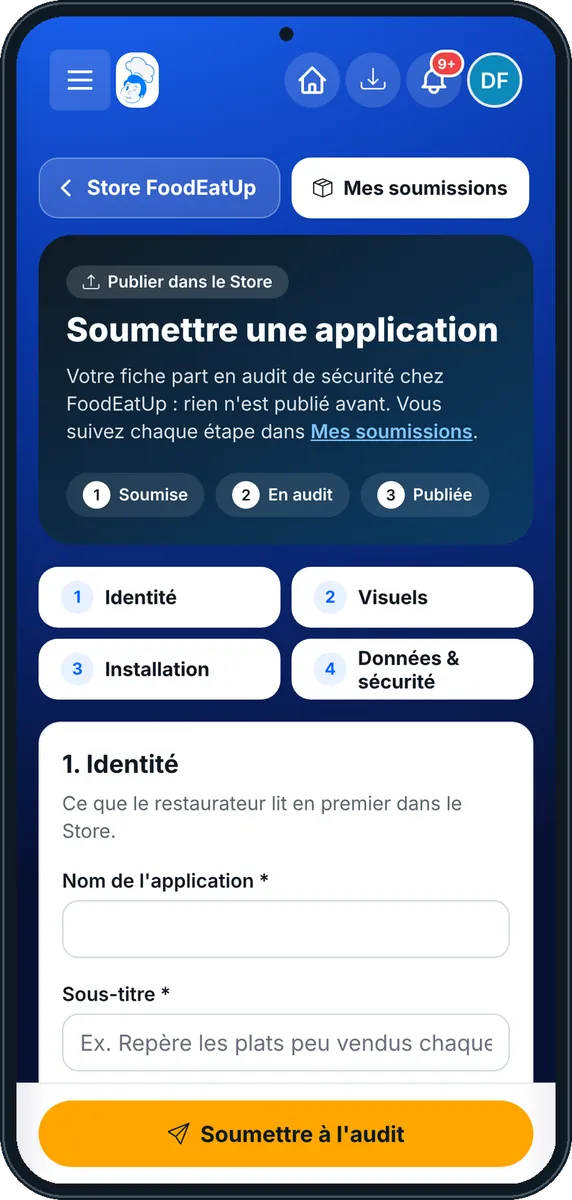
Publish on the Store — On the phone
On the phone
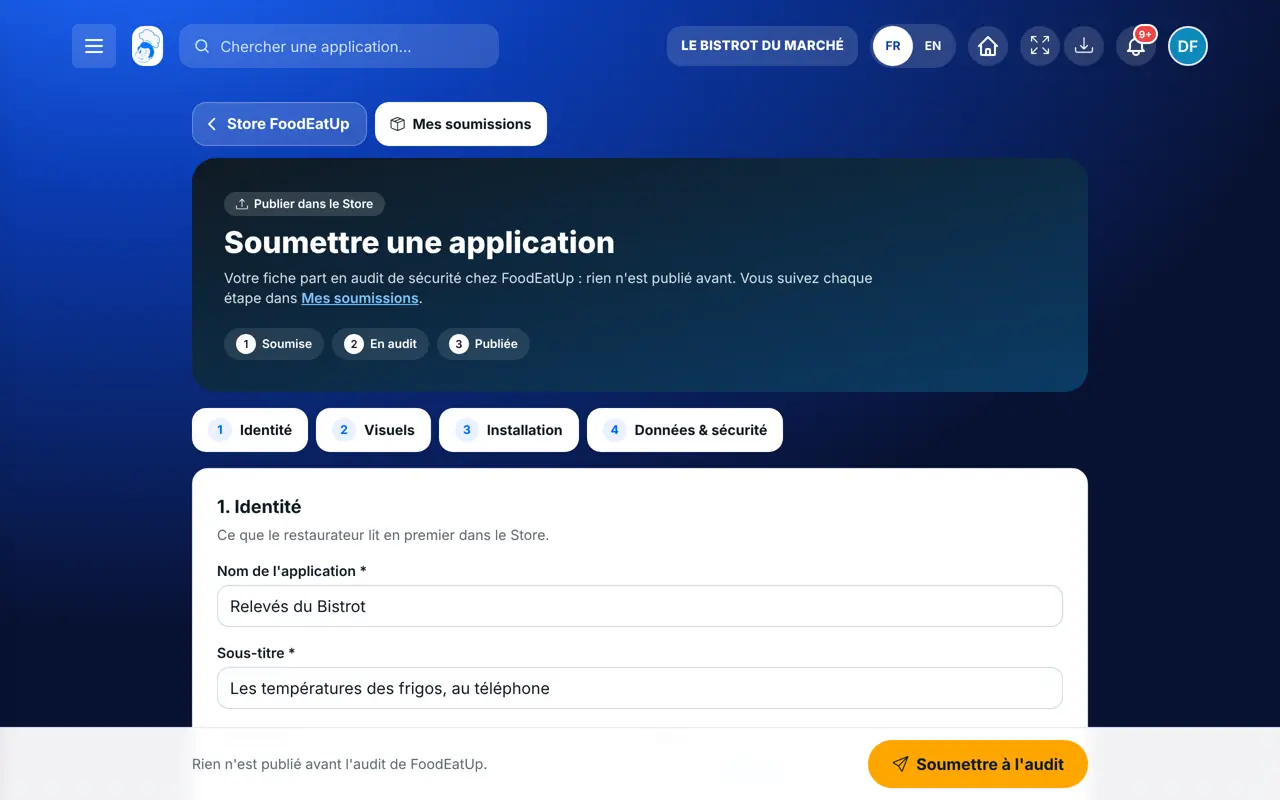
Publish on the Store — On the computer
On the computer

Step by step

Publish on the Store : 5 steps, with the real software screens.

  1. 1Step 1

    Build your tool

    An app: the “Créer mon application” page gives one hundred ideas, each with its prompt for Claude Code. An extension: the eight-step method on “/extensions/methode”. A game: your own web game, or the game-maker agent in Marketing › FoodEatUp Game. Always work in a new repository, in your name.

    The choice: app, extension or game
  2. 2Step 2

    Fill in the page

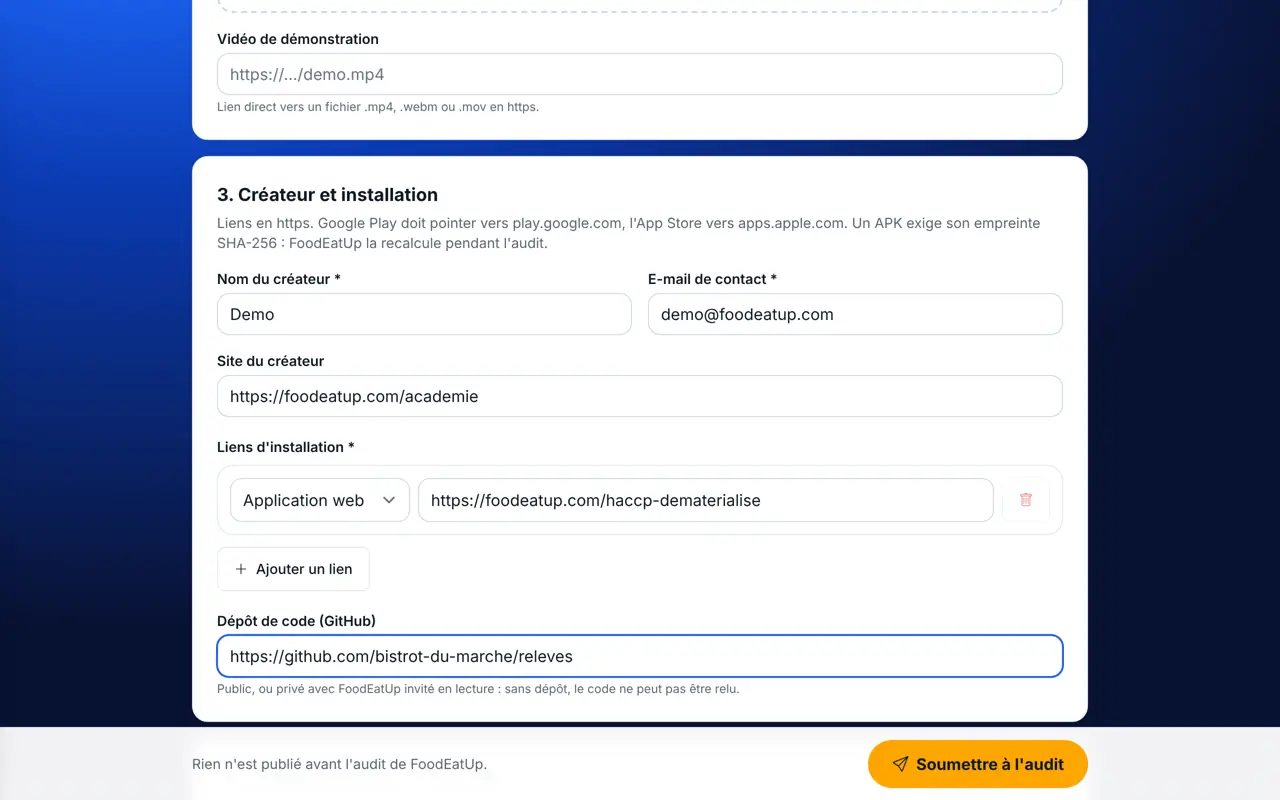
    Tap “Soumettre une application” in the Store. The form has four parts: Identité (name, category, type, descriptions, version), Visuels (square icon, screenshots, video), Créateur et installation (your details, the links), Langues, données et sécurité (data collected, MCP tools used, privacy policy). Tick the Store rules, then send.

    The “Soumettre une application” form
  3. 3Step 3

    Follow your submission

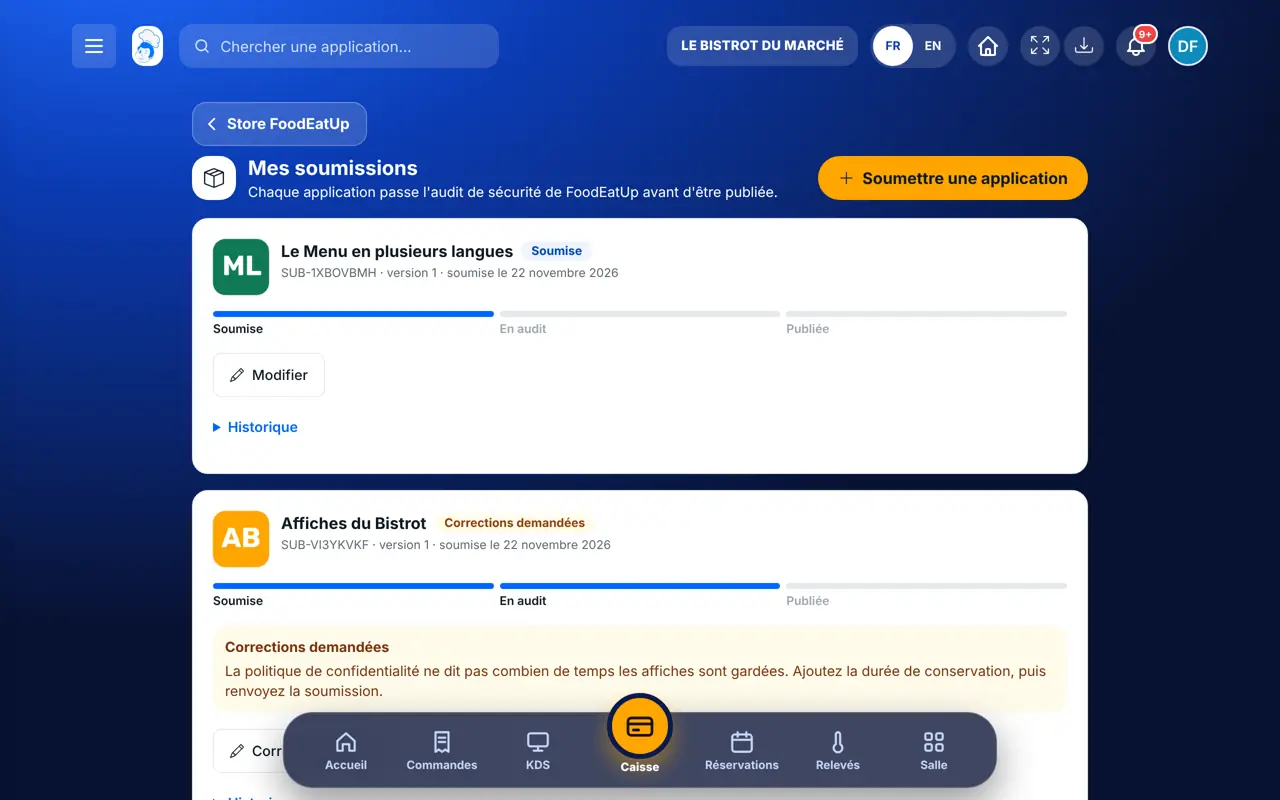
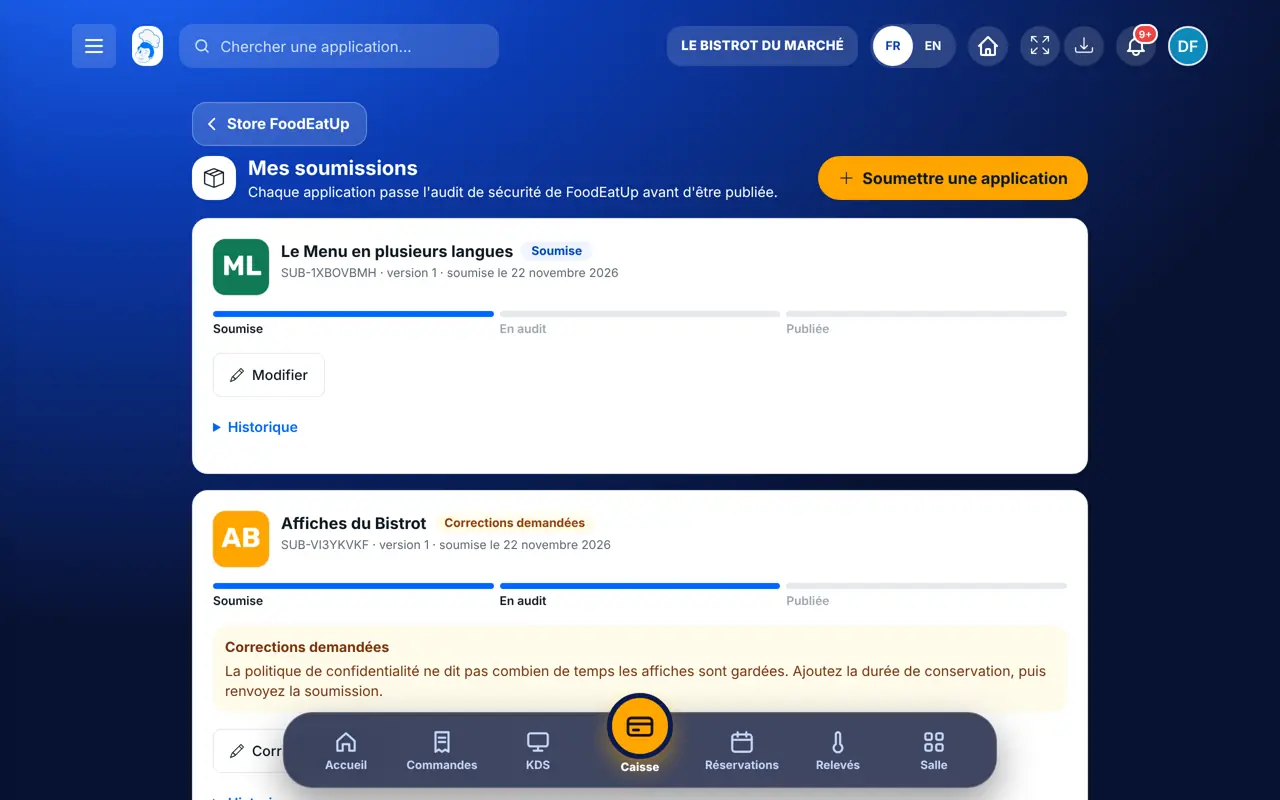
    You land on “Mes soumissions”. Each submission has its reference (SUB-…), its version and a progress bar: Soumise, En audit, Publiée. You get a notification and an email at every status change.

    The “Mes soumissions” page
  4. 4Step 4

    FoodEatUp’s review

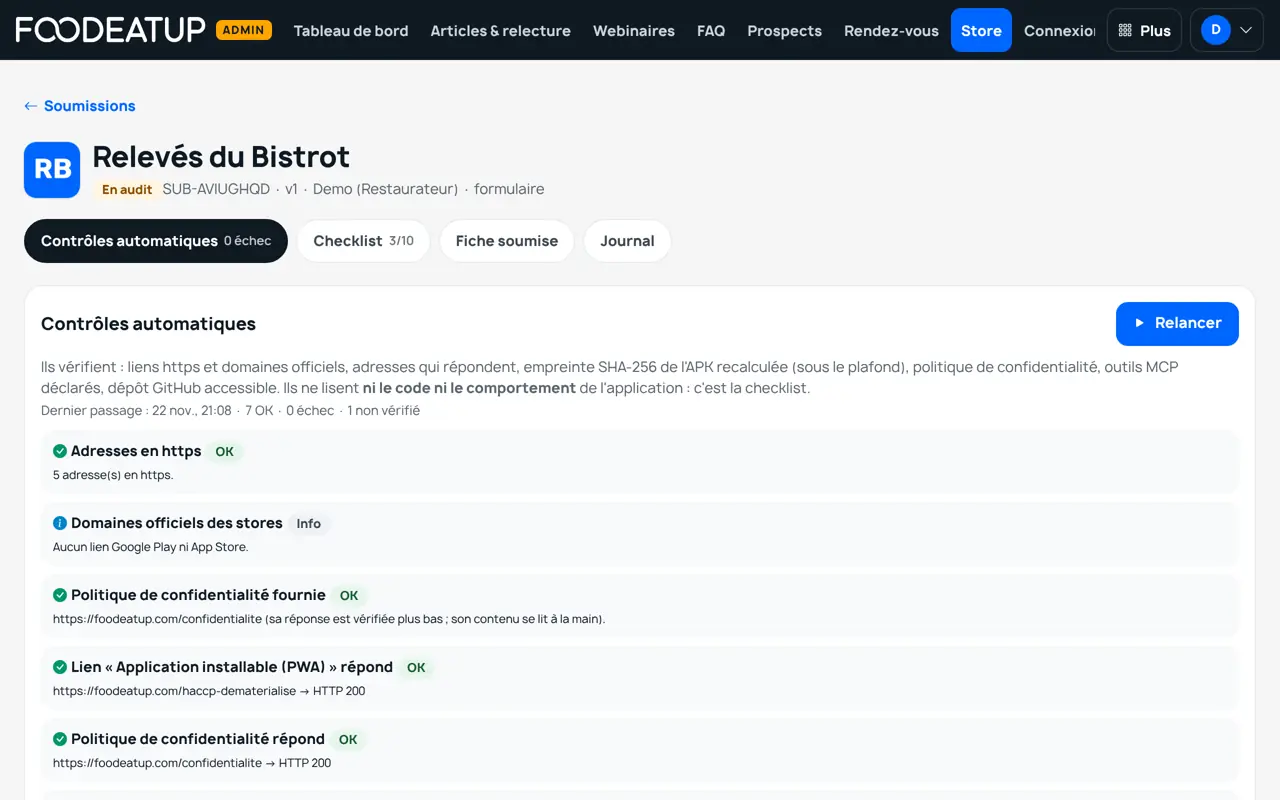
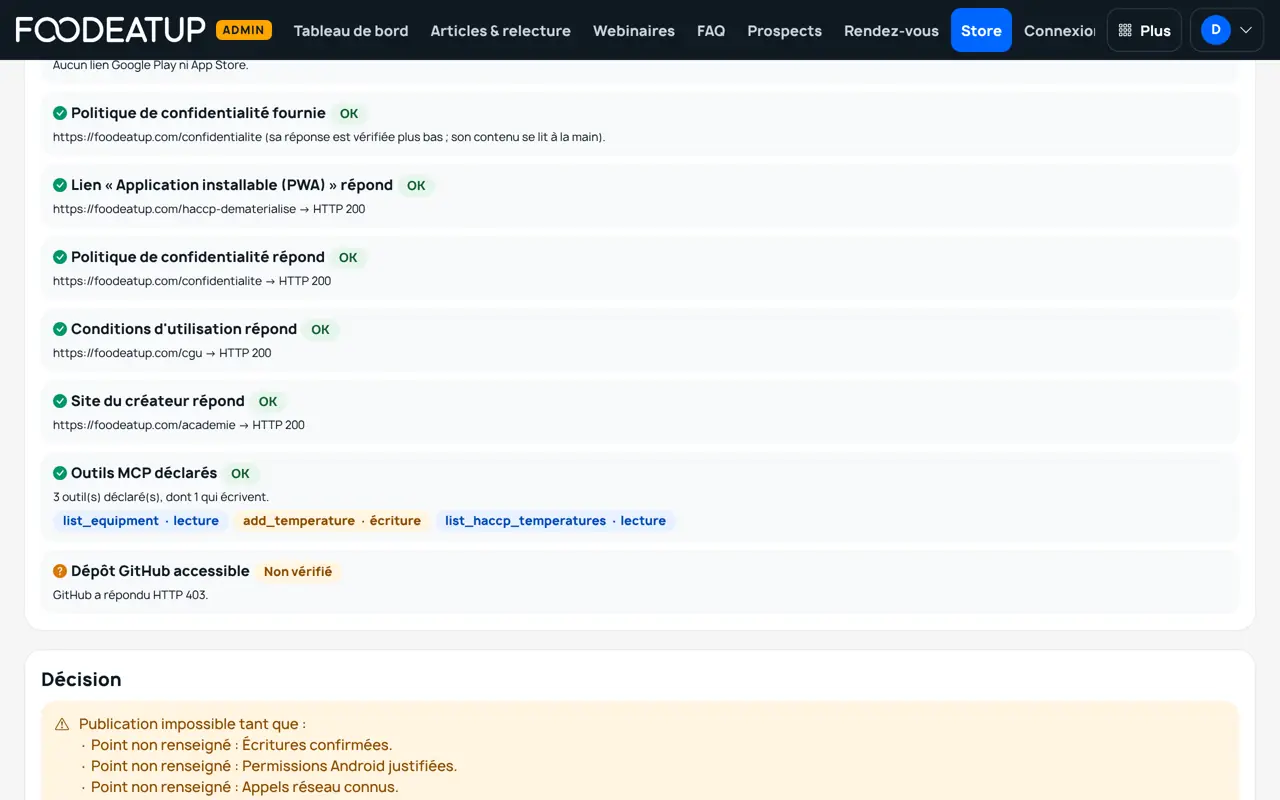
    FoodEatUp runs the automatic checks (https links, addresses that answer, official store domains, APK checksum, MCP tools that exist, GitHub repository), then fills in its ten-point checklist: secrets, tokens, each restaurant’s data, confirmed writes, permissions, GDPR, honest page, brand.

    The review screen, on FoodEatUp’s side
  5. 5Step 5

    Fix, then see the page online

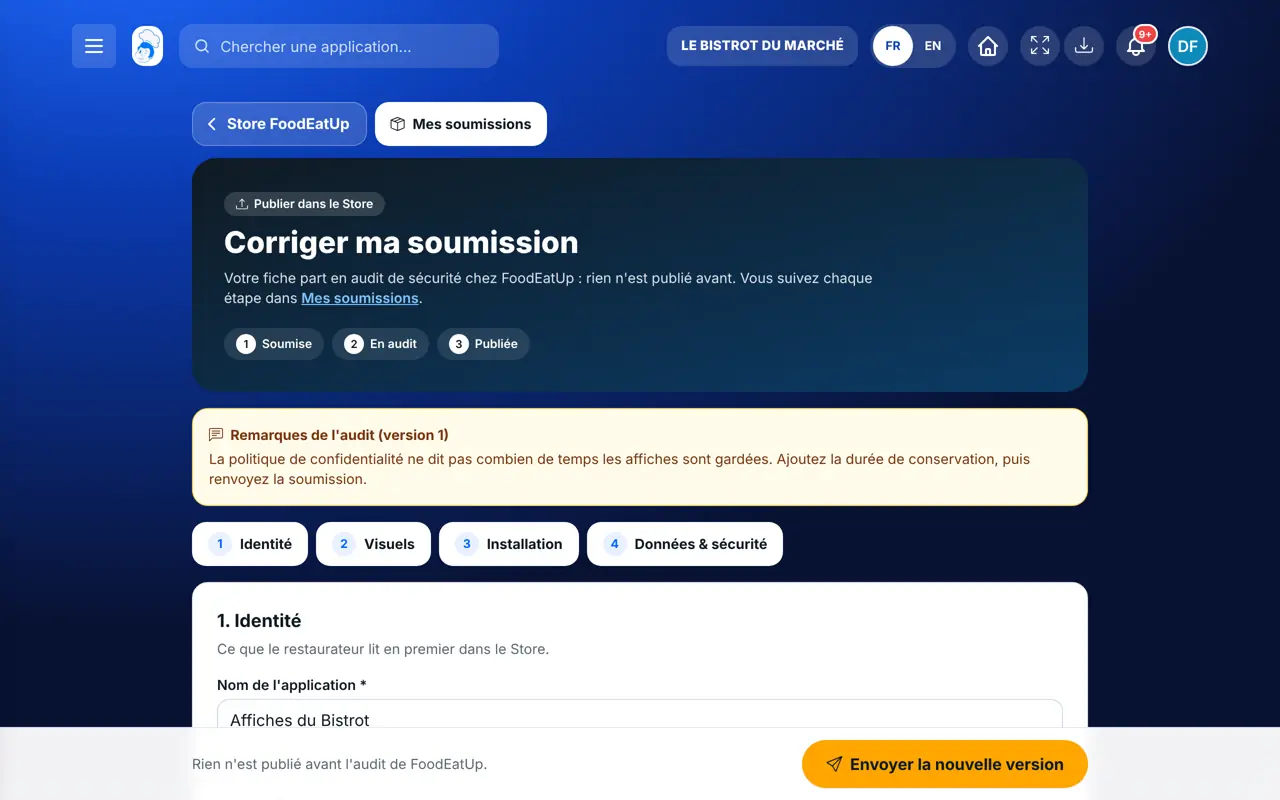
    If FoodEatUp asks for changes, the reason appears on your submission: tap “Corriger et renvoyer”. A new version goes back to review. Once published, “Voir la fiche publiée” opens your app in the Store.

Every screen, every button

Each screen in detail: what every button is for and what it triggers.

An app

A Flutter app that talks to FoodEatUp through the MCP server, like our own apps (mobile till, HACCP, digital menu, recipes).
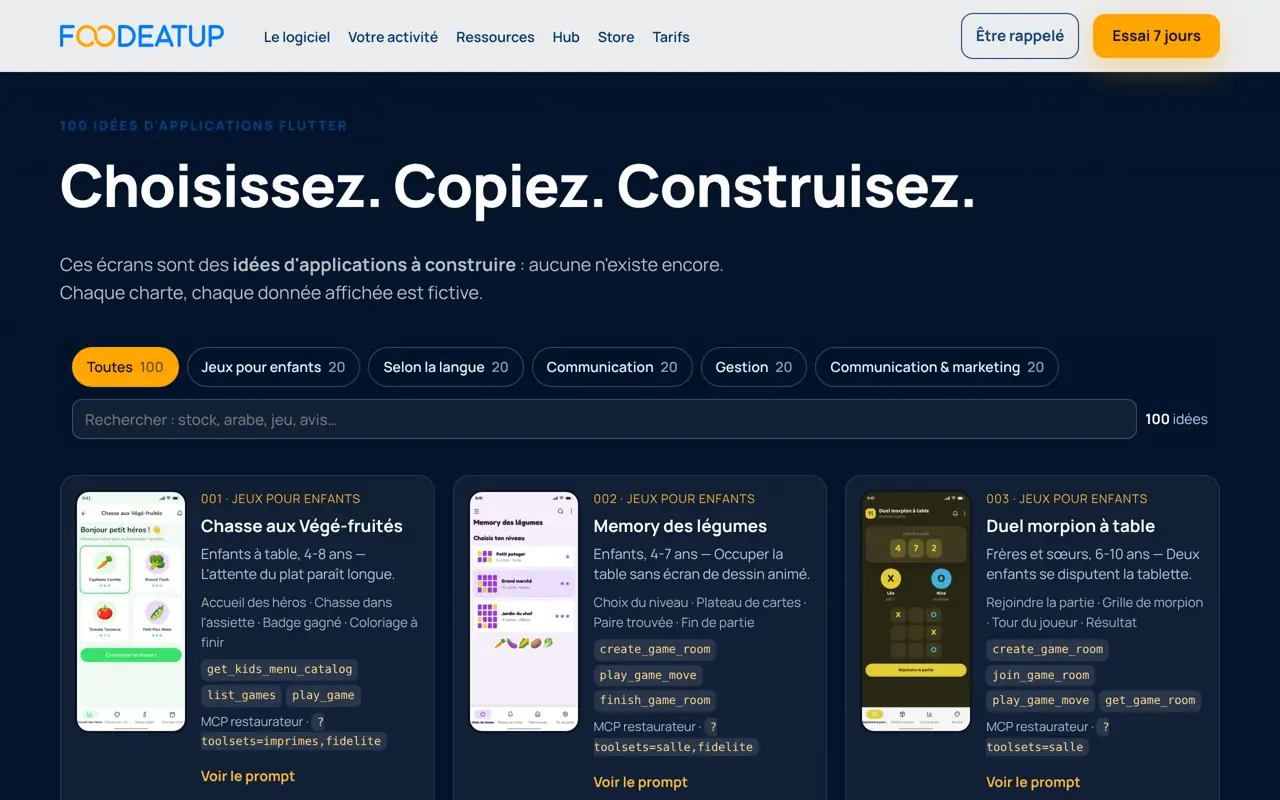
Publish on the Store — An app
  1. Open the “Créer mon application” page of the website: one hundred ideas in five families (kids’ games, languages, communication, management, marketing).
  2. Choose an idea and copy its prompt: it names the idea’s real MCP tools and the method of our apps (new repository, OAuth login, confirmed writes, tests).
  3. Paste it into Claude Code, in a new repository in your name. FoodEatUp’s code is never changed.
  4. Build, test, then publish the app where it is installed: web version, PWA, Google Play, App Store or APK file.

The screens of the hundred ideas are idea mock-ups: nothing is built yet. Your app will be the first.
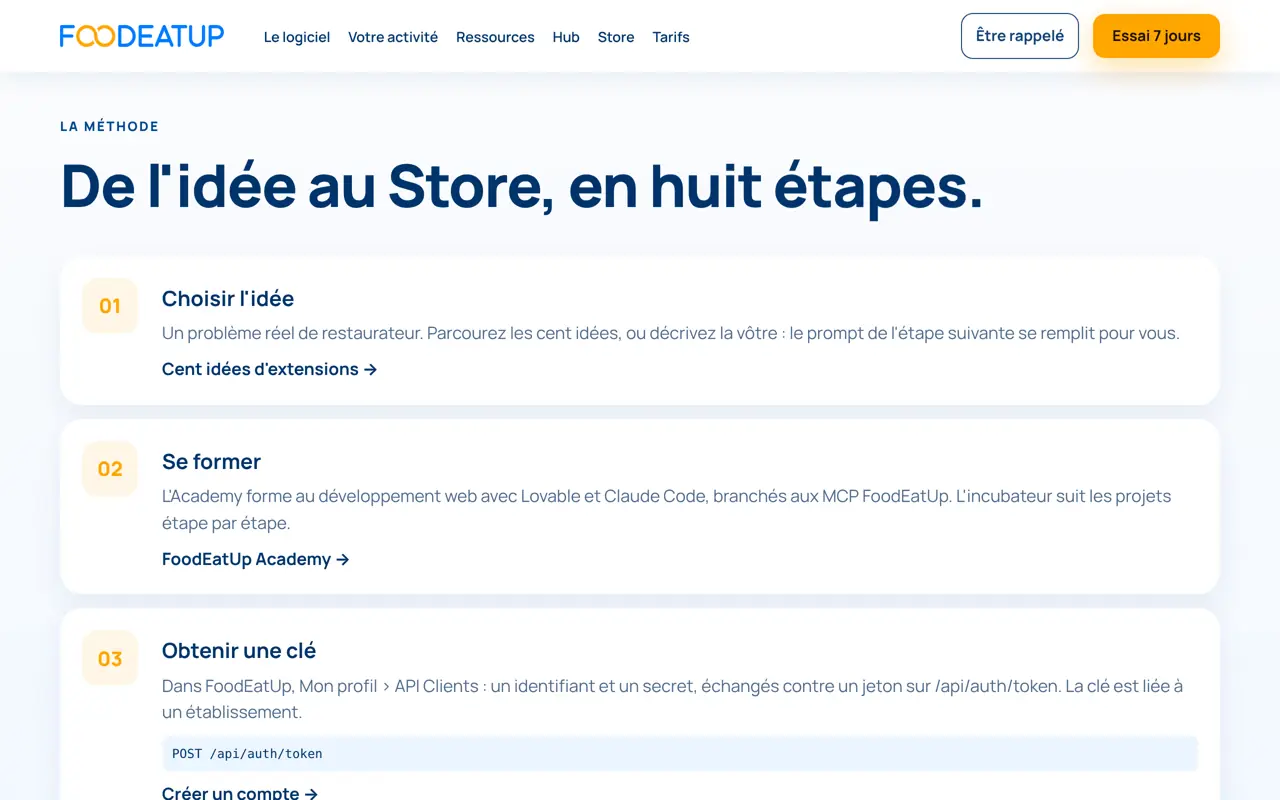
An extension

An extension adds a service around FoodEatUp: an agent, a Claude plugin, an MCP connector, a web tool connected to the API.

Publish on the Store — An extension
Get a key
My profile › API keys: an ID and a secret, exchanged for a token. The key is tied to one establishment and stays on the server side.
Explore the tools
The MCP server lists its tools (tools/list). The public documentation /tutoriels is generated from the same registry.
The Claude plugin
The “Plugin Claude” page gives the marketplace to add in Claude Code and the FoodEatUp plugins.
The method
The “/extensions/methode” page walks through the eight steps, from idea to Store. From your assistant, the get_extension_method tool gives it too.

Every write of your extension must go through a preview, then confirm:true after the restaurant owner agrees. It is a point of the review checklist.

A game

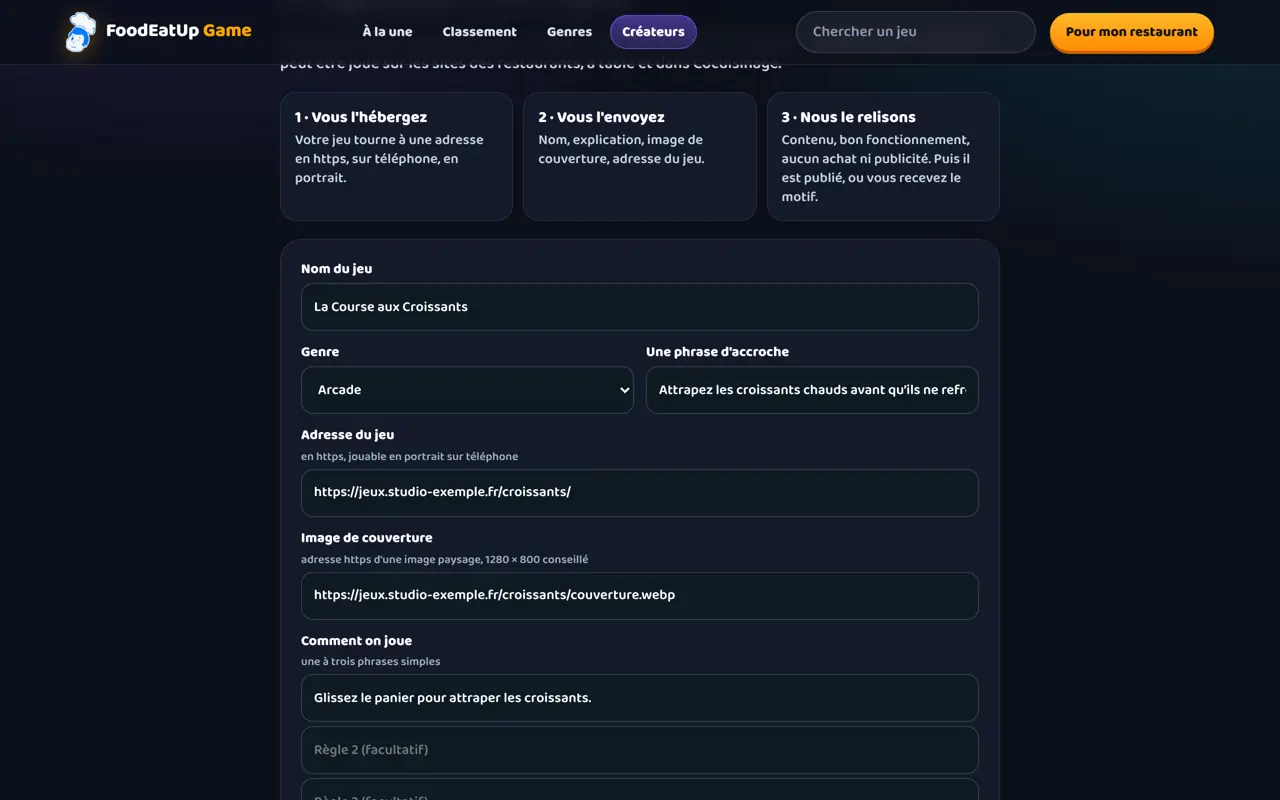
Two paths, depending on who you are. Games do not go through the Store form: they have their own store, FoodEatUp Game.

Publish on the Store — A game
Submit your game (creator)
On /jeux/proposer: game name, genre, tagline, https address of the game, cover image, how to play (one to three sentences), your name and email. The game arrives “submitted”: FoodEatUp publishes it, refuses it with a reason, or withdraws it.
Create a game with the agent (restaurant)
In Marketing › FoodEatUp Game, the “Créer un jeu avec l’agent” block appears when the game-maker agent is open on your account. The game is checked, then playable only in your restaurant, in an isolated page. It does not enter the store.
Where it is played
A submitted and published game is played in an isolated frame, separate from the website. FoodEatUp decides whether it is shown to restaurants, to the Cocuisinage community, or both.

Submit

The “Soumettre une application” form is the only way into the Store. Everything is checked before it is saved: a missing field is named.

Publish on the Store — Submit
1. Identité
Name, subtitle, category, type (app or extension), short description, long description (at least 80 characters), version and release notes.
2. Visuels
Square icon (at least 256 pixels), one to ten screenshots (portrait or landscape, with a caption), optional video as a direct file (.mp4, .webm or .mov).
3. Créateur et installation
Your creator name, a contact email, your website, then the links: web, PWA, extension, MCP, Google Play, App Store or APK. An APK requires its SHA-256 checksum. The GitHub repository is optional.
4. Langues, données et sécurité
Languages, personal data collected and why (or “Aucune donnée personnelle collectée”), permissions, MCP tools used, privacy policy (required) and terms of use.
Accept the rules
Required box. A submission is always born “submitted”: never published, never certified.

Show the real app in the screenshots, with no promise or figure you cannot prove: the “honest page” is checked by FoodEatUp.

The checks

The automatic checks verify what can be verified without reading your code. The rest is the reviewer’s checklist.

Publish on the Store — The checks
Addresses in https
Every address on the page must start with https://.
Official domains
A Google Play link must lead to play.google.com, an App Store link to apps.apple.com.
Addresses answer
Each link, the privacy policy, the terms, the website, the video, the icon and the screenshots are called. A redirect to an internal network is refused.
APK checksum
The file is downloaded and its SHA-256 checksum recalculated. Beyond the size limit, or if it does not download, the check stays “not verified”, never “ok”.
Declared MCP tools
Each tool named must exist on the server. The check counts those that write.
GitHub repository
The repository must be readable by FoodEatUp. A private or missing repository fails.
What they do not check
Neither the code nor the behaviour of the app. Secrets, tokens, data, GDPR and brand are reviewed by hand, point by point.

Follow my submission

The “Mes soumissions” page only shows yours. Every status change is sent to you by notification and by email.

Publish on the Store — Follow my submission
Soumise
Your submission is waiting for review. You can still change it.
En audit
FoodEatUp is reviewing it. It cannot be changed meanwhile.
Corrections demandées
The reason appears in orange. Tap “Corriger et renvoyer”.
Refusée
The reason for the refusal appears in red.
Publiée
Your app is in the Store: “Voir la fiche publiée”.
Historique
Each step, dated, with the reason when there is one.

The “Certifiée” badge is never given by publication: it is kept for apps published by FoodEatUp.

Update a version

A submission can be fixed while it is “submitted” or “changes requested”. A published app is updated through a new submission.

Publish on the Store — Update a version
  1. In “Mes soumissions”, tap “Modifier” or “Corriger et renvoyer”: the form comes back filled in.
  2. Change what is needed, raise the version number, write the release notes, then send again.
  3. The next version goes back to review: the checks and the checklist are done again.
  4. For an app already published, open /store/soumettre?slug= followed by your page address (there is no button on the page yet), or ask your assistant for the update. The page online only changes when the new version is published.
The result

The result

Your app has its page in the Store, with your creator name, your screenshots and your install links. It does not have the “Certifiée” badge: that is kept for FoodEatUp. An APK from another creator shows the warning “Application non sécurisée et non officielle FoodEatUp”.

See how to publish on the website (in French) →
The result : Publish on the Store

Owner and employee: what changes

The owner

Submits an app, follows it in “Mes soumissions” and fixes it. From their assistant, publish_store_app prepares a submission: a preview first, then confirm:true.

Publish on the Store — The owner

The employee

Can also submit from their account and only sees their own submissions. The Store MCP tools are kept for the owner.

Do it with your assistant

Claude, ChatGPT or Mistral’s Le Chat, connected to FoodEatUp. Copy the request and replace your establishment number.

Which tool should I build for my need?

In FoodEatUp, for my establishment [number], I want to build [my idea, for example a temperature-reading app]. Tell me which FoodEatUp screen already does this job and which tutorial shows it, so my app can build on it.

What you getThe screen and the tutorial that already do this: your app builds on them instead of redoing them.

Tools used : search_foodeatup_help, get_foodeatup_tutorial

A screen’s lesson before connecting it

In FoodEatUp, for my establishment [number], give me the lesson of the screen [screen name]: what it is for, its steps and what to check.

What you getThe screen card, its steps and its school-mode mission: enough to understand what your tool will read or write.

Tools used : get_hub_lesson

The games already open at my place

In FoodEatUp, for my establishment [number], list the games open to my customers, so I can propose a game that is missing.

What you getThe list of games already offered to your customers.

Tools used : list_games

What you gain

An audience already there

The Store is open to every FoodEatUp account.

A serious review

Automatic checks and a ten-point checklist before going online.

You stay in control

Your creator name on the page, your versions, your fixes.

Clear follow-up

A reference, a status, a reason: never a silent submission.

The Chef’s tip

Before submitting, ask your assistant for a security review of your repository: get_extension_audit_prompt gives the instructions and submit_extension_audit files the report in your submission. The report helps FoodEatUp but never publishes on its own: the decision stays with FoodEatUp.

Frequently asked questions

How long does the review take?

FoodEatUp does not commit to a delay. You are told by notification and email at every status change, and the “Mes soumissions” page always shows where your submission stands.

Can my app get the “Certifiée” badge?

No. Publication never gives this badge: it is kept for apps published by FoodEatUp. An APK from another creator is flagged as unofficial.

Can I publish straight from Claude?

No. From your assistant, publish_store_app first shows a preview, then creates a submission with confirm:true. It goes through the same review as the form.

Text version for AI assistants →

Share this tutorial

Send it to your team, your partner or your accountant. The image below appears in the message.

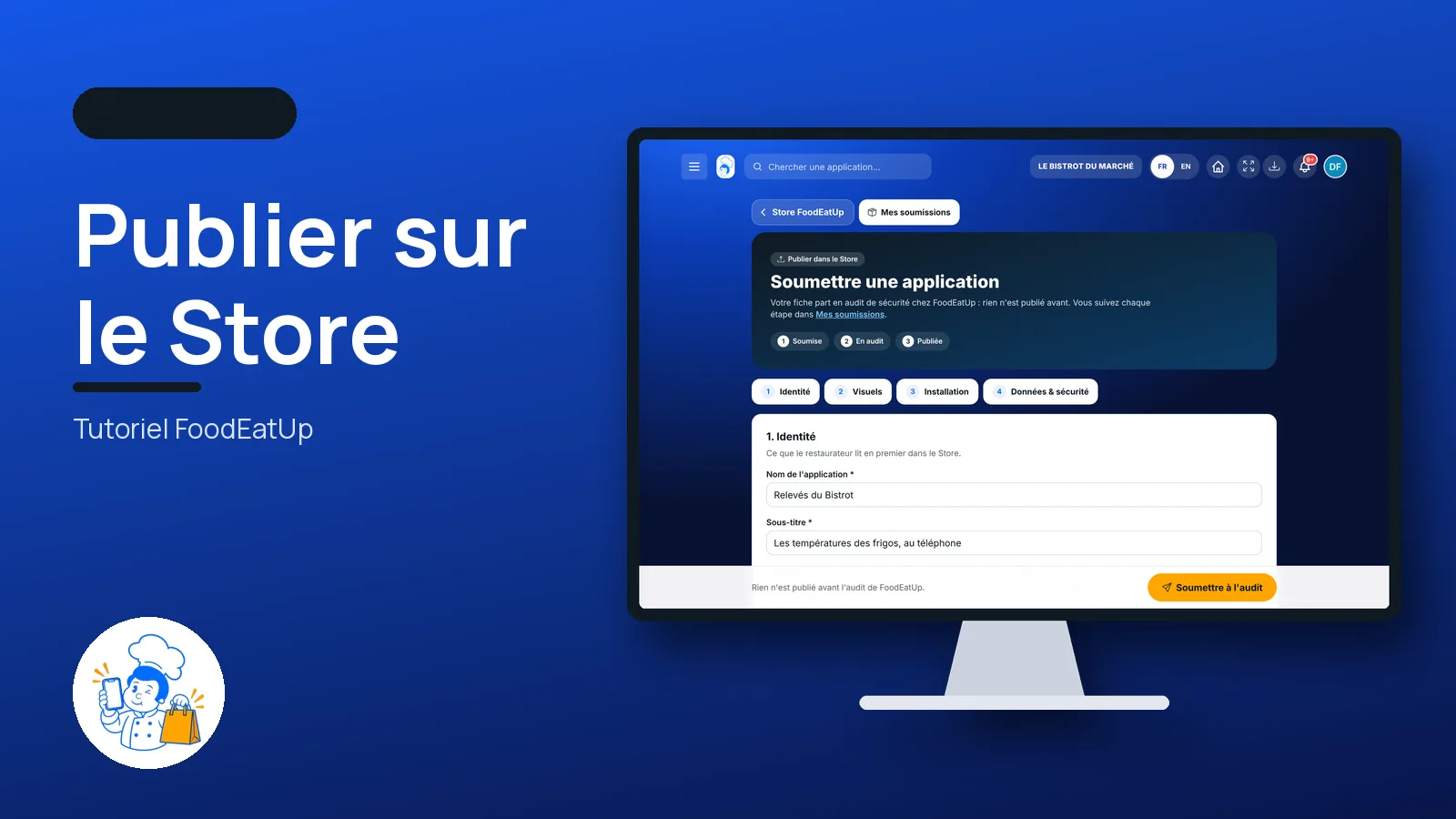
Share preview : Publish on the Store
WhatsAppLinkedInFacebookEmail

Send to an AI assistant

Claude, ChatGPT or Le Chat read this tutorial and explain it to you. Connected to FoodEatUp, they do it with you.

Read this FoodEatUp tutorial: https://foodeatup.com/en/academy/compte/store-publier.md Explain it to me simply, step by step, then help me do it in my restaurant. If FoodEatUp is connected to you, do it with me and show me the preview before every change.

ClaudeLe ChatChatGPT

Open in my software

Type your establishment number: the link takes you straight to this screen. The number stays on this device.

Publish on the FoodEatUp Store (in French) →

You can read it in the software address: foodeatup.com/establishment/number/…